Snapchat’s algorithm is only as smart as the conversions you send it.
And most accounts I look at send about half. Ad blockers eat some, Safari eats some, the cookie banner eats some, and the affiliate network keeps the rest to itself.
Then people decide “Snapchat doesn’t convert”. Sometimes it doesn’t. Often it just can’t see.
Here’s the setup that fixes it.
Field names checked against Snap’s developer docs on 4 November 2026.
Pixel vs Conversions API, in one minute
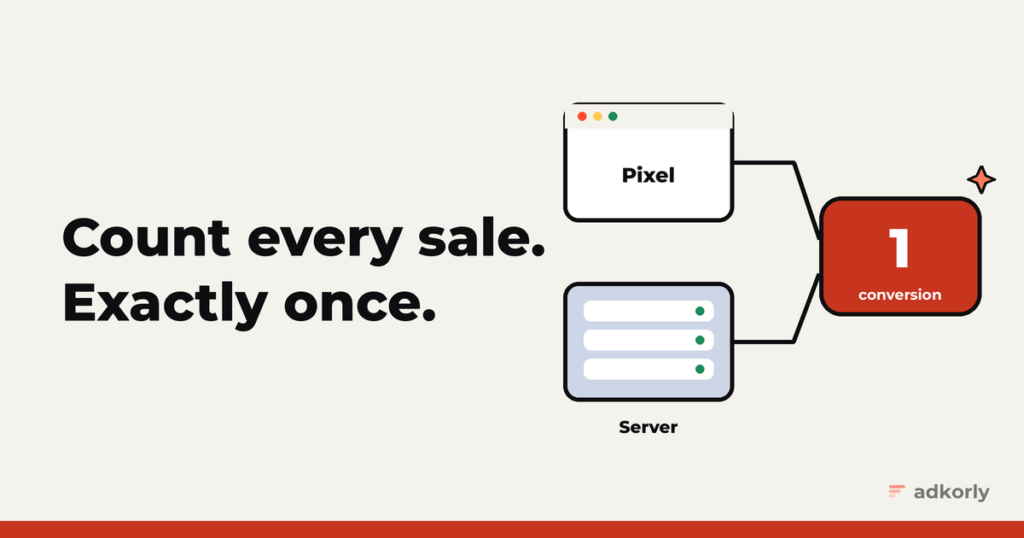
The Snap Pixel is a piece of JavaScript on your site. It fires events from the visitor’s browser. Easy to install, and easy to block: ad blockers, Safari’s tracking limits and declined cookie banners all stop it.
The Conversions API (CAPI) sends the same events from your server straight to Snap. No browser in the middle, so nothing to block.
The right answer is both, with deduplication, so every conversion gets counted exactly once.
The events that matter
Snap has a long list of standard events. For performance campaigns you mostly need these:
PAGE_VIEWandVIEW_CONTENTfor landing and product pagesADD_CARTandSTART_CHECKOUTif you run a shopSIGN_UPfor leads and registrationsPURCHASE, which must carryvalueandcurrency
Use the standard names. If nothing fits, Snap gives you CUSTOM_EVENT_1 to CUSTOM_EVENT_5.
Affiliates: your sale happens on someone else’s site
This is the part most guides skip. As an affiliate you usually don’t own the checkout. The sale happens on the merchant’s site, and the Pixel never sees it.
The fix is server to server:
- Save Snap’s click ID when the visitor lands. Snap adds
ScCidto your landing page URL. Store it, and pass it to the network as a sub ID. - The network sends a postback to your server when the sale happens, with that sub ID.
- Your server sends a
PURCHASEto the Conversions API with the click ID insc_click_id, plus the payout asvalue.
Now Snap sees the sales it drove, even though they happened three domains away. This one setup is often the difference between “Snapchat doesn’t work” and a campaign that scales.
Deduplication: the bit everyone gets wrong
If the Pixel and your server both report the same purchase, Snap needs to know it’s one purchase, not two. Otherwise your numbers double and the algorithm optimizes for ghosts.
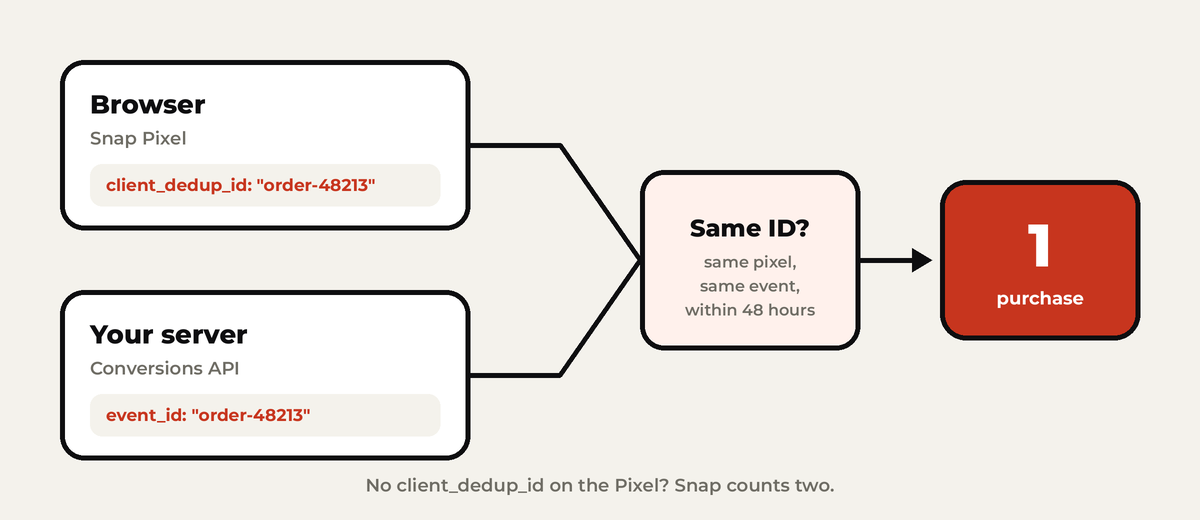
The rules, straight from Snap:
- The Pixel’s
client_dedup_idmust equal the Conversions API’sevent_id. Exactly the same string, same casing. - Same Pixel ID and same event name on both sides.
- One ID per conversion. Not per visitor, not per session.
- The window is 48 hours. For purchases there’s a fallback: Pixel
transaction_idplusorder_idin the Conversions API, with up to 30 days.
The classic mistake: not setting client_dedup_id at all. Then the Pixel makes up its own ID that your server can never know, and nothing deduplicates.
Send match keys with every event
Snap has to connect each event to a Snapchat user. The more clues you send, the more conversions it can match:
- Email and phone, normalized (lowercase, trimmed, phone with country code) and hashed with SHA-256
- IP address and user agent, not hashed
sc_click_idfrom theScCidURL parameter, not hashedsc_cookie1from the_scidfirst-party cookie. Snap calls this “highly recommended”, not hashed
A minimal server event looks roughly like this:
{
  "event_name": "PURCHASE",
  "event_time": 1793800000000,
  "event_source_url": "https://example.com/thank-you",
  "action_source": "WEB",
  "event_id": "order-48213",
  "user_data": {
    "em": ["<sha256 of the email>"],
    "client_ip_address": "203.0.113.7",
    "client_user_agent": "Mozilla/5.0 ...",
    "sc_click_id": "<value of ScCid>",
    "sc_cookie1": "<value of _scid>"
  },
  "custom_data": { "value": 42.5, "currency": "EUR" }
}
The setup checklist
- Get a token. An Organization Admin generates a Conversions API token in Ads Manager under Business Details, OAuth Apps, Conversions API Tokens. It doesn’t expire, so keep it on your server and never in your site’s code.
- Install the Pixel on every page, and pass a
client_dedup_idwith every event you also send from the server. - Capture
ScCidon landing and keep it with the lead or order. - Send server events with
event_id, the match keys and, for purchases,valueandcurrency. - Test before trusting. Add a
test_event_codewhile testing and watch the events arrive in Events Manager. Give the deduplication diagnostics up to 24 hours. - Respect consent. In the EU, no Pixel before the visitor says yes, and the Conversions API needs a legal basis too. Don’t send server events for people who said no.
The mistakes I see most
- No dedup ID, so conversions are counted twice.
PURCHASEwithout a value, so Snap can’t optimize for value.- Old events. Snap refuses events more than 7 days old, and some network postbacks arrive late.
- Hashing the wrong things. Hash email and phone. Don’t hash IP, user agent or click IDs.
- The token in front-end code, where anyone can read it.
The easy way
Shopify and the big platforms have Snap integrations built in. On WordPress, full disclosure: I built Straycy, a plugin that sends server-side events to Snap, Meta, Google and Reddit. Use it or don’t, but get the Conversions API running either way.
Better tracking won’t fix a bad offer. But it stops you from killing a good one because the numbers were half missing. And once your tracking works, the next bottleneck is usually getting enough ads through review.
Running on more than Snapchat? Here’s the full tracking setup series.
What’s your Snapchat tracking setup today: Pixel only, Conversions API, or “we check the network dashboard and pray”? Tell me, no judgement.
Cheers,
Johannes