Meta’s algorithm is scary good at finding buyers.
As long as it knows who bought. If your Pixel misses a third of your sales, Meta optimizes for the two thirds it can see, and you pay for the difference.
The fix has a name, the Conversions API, and in 2026 it’s not optional anymore. Here’s the setup.
Checked against Meta’s developer docs on 10 November 2026. The current Graph API version is v26.0.
Pixel vs Conversions API
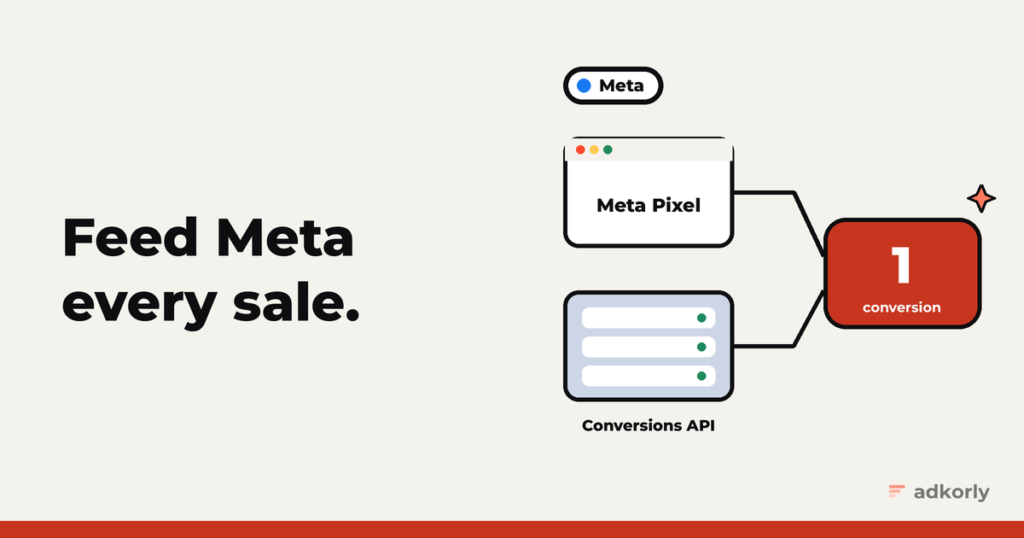
- The Meta Pixel runs in the browser. Easy to install, easy to block: ad blockers, Safari, declined cookie banners.
- The Conversions API (CAPI) sends the same events from your server. Nothing in the browser to block.
You want both, deduplicated, so every conversion counts once. Meta recommends exactly that.
Step 1: the Pixel
Base code on every page, ideally in the <head>. Then standard events where they happen. The ones that matter for performance:
ViewContent,AddToCart,InitiateCheckoutLeadandCompleteRegistrationPurchase, which needsvalueandcurrency
Use the standard names exactly as written.
Step 2: the Conversions API
Get a token. In Events Manager, open your Pixel, go to Settings, and under Conversions API, “Set up manually”, click “Generate access token”. You need developer access in the business for the link to show. No app review needed.
Send events to:
POST https://graph.facebook.com/v26.0/{PIXEL_ID}/events?access_token={TOKEN}A minimal purchase:
{
  "data": [{
    "event_name": "Purchase",
    "event_time": 1793800000,
    "event_id": "order-48213",
    "action_source": "website",
    "event_source_url": "https://example.com/thank-you",
    "user_data": {
      "em": ["<sha256 of the email>"],
      "client_ip_address": "203.0.113.7",
      "client_user_agent": "Mozilla/5.0 ...",
      "fbc": "fb.1.1793799000000.IwAR...",
      "fbp": "fb.1.1793790000000.1234567890"
    },
    "custom_data": { "value": 42.5, "currency": "EUR" }
  }]
}
The rules worth tattooing somewhere:
event_timeis in seconds, not milliseconds. (Snap wants milliseconds. Fun.)- Events can be at most 7 days old. And one old event fails the whole request, so filter before you send.
- Up to 1,000 events per request. Meta recommends sending within the hour.
- Website events need
event_source_urlandclient_user_agent.
Deduplication: one purchase, counted once
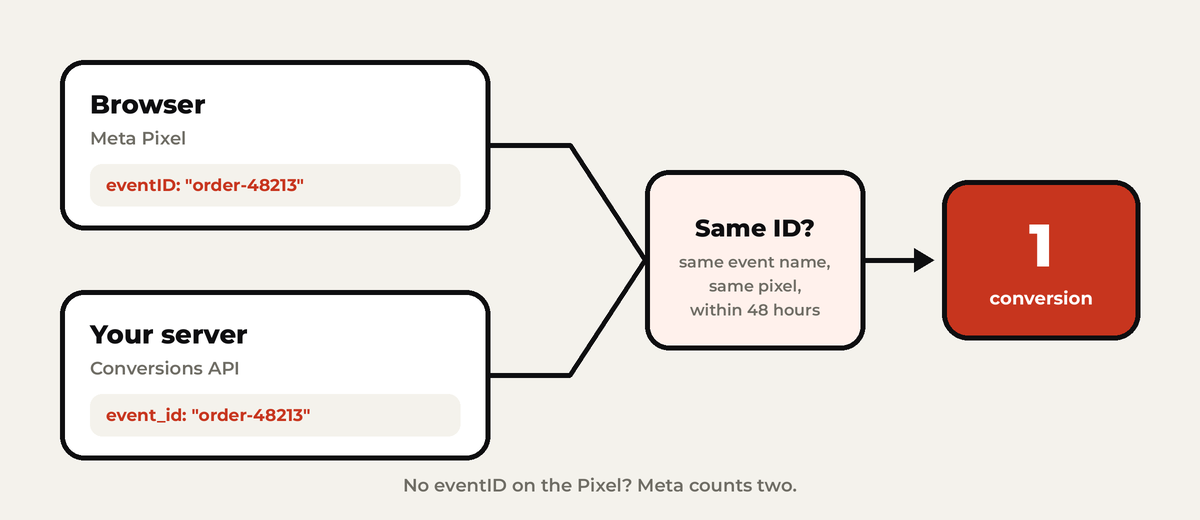
- Pixel
eventID= CAPIevent_id. In the Pixel it’s the fourth argument:fbq('track', 'Purchase', {value: 42.5, currency: 'EUR'}, {eventID: 'order-48213'}); - Same event name, same Pixel.
- Within 48 hours of the first one. Meta generally keeps whichever arrived first.
Two browser events in a row, or two server events in a row, are not deduplicated. Only browser plus server.
Match keys: help Meta find the person
The more you send, the more conversions Meta can connect to a real person:
- Hash with SHA-256 (after normalizing):
em,ph,fn,ln,ct,st,zp,country,db,ge. Email trimmed and lowercase. Phone digits only, with country code. - Never hash
client_ip_address,client_user_agent,fbcorfbp. fbccomes from the click:fb.1.{time in ms}.{fbclid}. Keep thefbclidexactly as it came, case included.fbpis Meta’s browser ID from the_fbpcookie.
Meta scores this as Event Match Quality, from 1 to 10, on your Pixel’s overview in Events Manager. It’s the single best health check for your setup.
Affiliates: the sale happens on someone else’s site
Same playbook as on every platform:
- Save
fbclidfrom your landing page URL, along with_fbpif you have it. - Pass a sub ID to the network.
- When the postback comes in, send a
Purchase(orLead) to the Conversions API withfbcbuilt from the storedfbclid, plus the payout asvalue.
Meta explicitly allows building fbc yourself from a stored fbclid, using the time you first saw it. Without this, Meta never learns which clicks made you money.
Testing
- Test Events in Events Manager gives you a
test_event_code. Add it next todatain your request and watch events arrive. - Remove it before going live. Test events are not dropped, they count.
- Test with your own details. Events that don’t match a real Meta account may be discarded.
Consent and data rules
- EU visitors: no Pixel before consent. Meta supports
fbq('consent', 'revoke')andfbq('consent', 'grant'), and you call revoke on every page until they agree. Server events need a legal basis too. - US privacy laws: Limited Data Use, through
data_processing_options: ["LDU"]. - Health and wellness: Meta restricts what data these advertisers can send, on both Pixel and CAPI. If you’re in that space, check your Events Manager for restrictions before you trust the numbers.
The easy way
You have options before writing code:
- Meta’s one-click Conversions API. Meta-hosted and free, switched on in Events Manager. It mirrors your Pixel’s events from Meta’s side.
- Conversions API Gateway. Runs in your own AWS or Google Cloud account, no coding.
- Server-side Google Tag Manager, with Meta’s Conversions API tag.
- On WordPress, full disclosure: I built Straycy, which sends server-side events to Meta, Google, Snap and Reddit.
For affiliate postbacks, you’ll still need something on your server. None of the browser-based shortcuts can see a sale on the merchant’s site.
The mistakes I see most
- No
eventIDon the Pixel, so everything counts twice. - Seconds vs milliseconds in
event_time. Your events land in 1970 or the year 58,000. - Hashing the IP address. Don’t.
- Changing the
fbclid‘s case. It breaksfbc. - Leaving
test_event_codein production. - One stale event in a batch, which fails the whole request.
New to all this? Start with why server-side tracking matters. Then do the same for Google Ads, TikTok and Snapchat.
What’s your Event Match Quality right now? Anything under 6 and I’d love to hear what you’re sending. Tell me.
Cheers,
Johannes